M-Audio has been actively testing all applicable hardware and software products with each beta release of macOS 26 Tahoe. We understand how important it is for all our users to know exactly what works before they make the jump on any new updates. Please refer to this article for all M-Audio hardware and software compatibility with macOS 26 Tahoe.
For this reason, we encourage all our dedicated M-Audio product owners to refrain from updating to macOS 14 Tahoe until compatibility with the new operating system can be confirmed.
This page will be updated regularly to reflect any updates to product compatibility as testing is completed. We encourage all our users to remain on their current OS until all necessary hardware and software products have been qualified for support.
Contents
macOS 26 Tahoe Hardware Support
All compatibility testing for macOS Tahoe is performed on Intel and base-level Apple Silicon processors. Hardware support confirms testing passed for USB connection, as well as audio and/or MIDI communication.
Any product not listed below is not considered to be supported with macOS 26 Tahoe systems or Apple Silicon Processors.
Audio and MIDI Interfaces
| Product | Intel Processor | Apple Silicon |
| MIDISport Uno | Supported | Supported |
| Micro DAC 24/192 | Supported | Supported |
| M-Track Eight | Supported | Supported |
| Air 192|14 | Supported | Supported |
| M-Track 2x2 | Supported | Supported |
| Air 192|4 | Supported | Supported |
| M-Track 2x2M | Supported | Supported |
| Air 192|6 | Supported | Supported |
| Air 192|8 | Supported | Supported |
| Air Hub | Supported | Supported |
| M-Track Duo | Not Supported | Not Supported |
| M-Track Duo HD | Supported | Supported |
| M-Track Solo | Not Supported | Not Supported |
| Uber Mic | Supported | Supported |
*Firmware Updater software, Editors, and other utility software are not supported.
MIDI Controllers and Keyboards
| Product | Intel Processor | Apple Silicon |
|---|---|---|
| Keystation Mini 32 | Supported | Supported |
| Keystation Mini 32 MK3 | Supported | Supported |
| Keystation 88 MK3 | Supported | Supported |
| Oxygen 25 MK IV | Supported | Supported |
| Oxygen 25 MK V | Not Supported | Not Supported |
| Oxygen 49 MK IV | Supported | Supported |
| Oxygen 49 MK V* | Not Supported | Not Supported |
| Oxygen 61 MK IV | Supported | Supported |
| Oxygen 61 MK V | Supported | Supported |
| Code 49 | Supported | Supported |
| Code 61 | Supported | Supported |
| CTRL 49 | Supported | Supported |
| Keystation 49 MK3 | Supported | Supported |
| Keystation 61 MK3 | Supported | Supported |
| Oxygen 61 Pro | Supported | Supported |
| Oxygen Pro Mini | Supported | Supported |
| Hammer Pro 88 | Not Supported | Not Supported |
*Firmware Updater software, Editors, and other utility software are not supported.
macOS 26 Tahoe Software Support
Software Editors
M-Audio recommends installing any available software preset editors for your products in order to edit functionality that may be available directly on the product itself. Please refer to the table below for the latest versions of each software preset editor supported for use on macOS 26 Tahoe.
If you do not see your product's software editor listed below, it is not considered supported with macOS 26 Tahoe and Apple Silicon Processors.
| Product | Intel Processor | Apple Silicon |
|---|---|---|
| Code 25 Preset Editor | Not Supported | Not Supported |
| Code 49 Preset Editor | v1.0.9 | v1.0.9 |
| Code 61 Preset Editor | v1.0.9 | v1.0.9 |
| Oxygen Pro 49 Preset editor | v1.0.5 | v1.0.5 |
| Oxygen Pro 61, 25, Mini | v1.0.3 | v1.0.3 |
| Oxygen MKV Preset Editor | v1.0.1 | v1.0.1 |
Firmware Updaters
The following firmware update software is confirmed compatible with macOS 26 Tahoe. Firmware updates are only necessary for single-use updates to your product. Please refer to any release notes and update instructions included in the download prior to installing the software and updating your device firmware.
If you do not see your product's firmware updater listed below, the updater software is not considered supported with macOS 26 Tahoe and Apple Silicon Processors.
| Product | Intel Processor | Apple Silicon |
|---|---|---|
| Code Firmware Updater | Not Supported | Not Supported |
| Hammer 88 Pro Firmware Update | Not Supported | Not Supported |
| Oxygen Pro Series Firmware Updater | v2.1.2 | v2.1.2 |
Software Partners
Many of our products are dependent on software for all functionality and control while the device is connected to a computer. Our products may be considered "supported" for an operating system, but will not be functional until software support is also available. It is crucial that you confirm software compatibility before choosing to update your system.
Please check with the developers for your preferred software titles for the latest in macOS 26 Tahoe compatibility before choosing to update. We've listed a few key titles below for your convenience. Browser-based tutorial software such as Melodics, Skoove, and TakeLessons are not affected.
How do I prevent my system from updating automatically?
Please be sure to check that your operating system is not enabled to update itself automatically. While this can be a useful feature for some, anyone that relies on the stability of their software and hardware tools should prefer control over which base operating system is installed on their system. Automatic updates will not account for software compatibility before updating which could lead to problems with stability and other functionality if your gear is not ready for the changes in the operating system.
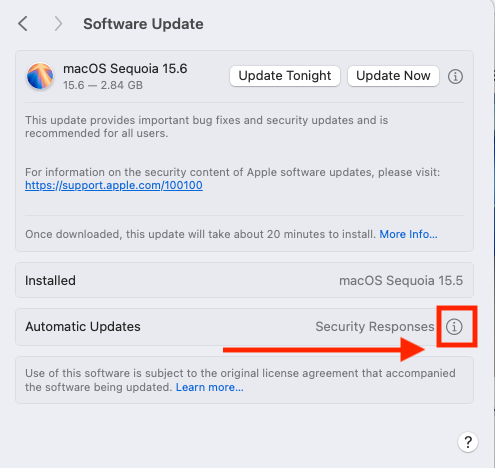
To avoid any delays or downtime, it's best to be deliberate with the decision to update and use the opportunity to check that all your software and hardware tools will be compatible before making the jump. To turn off automatic updates for macOS, please do the following:
- Navigate to System Settings > General > Software Update
- Click the Information (i) icon beside Automatic Updates
Uncheck all boxes below
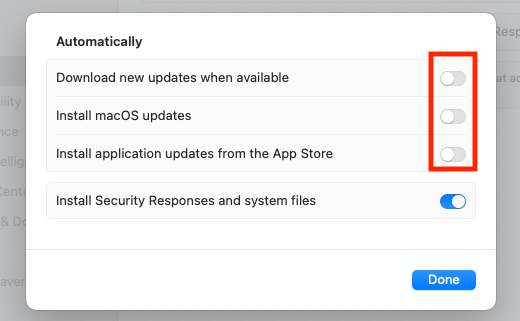
Click Done to apply the changes
Was this article helpful?
That’s Great!
Thank you for your feedback
Sorry! We couldn't be helpful
Thank you for your feedback
Feedback sent
We appreciate your effort and will try to fix the article